SMS Consent Flow
How Glimpzed captures explicit, unchecked-by-default consent before any safety SMS is sent to a Trusted Contact.
📋 Compliance documents — direct links
This SMS consent flow is governed by both documents below. Reviewers should open both directly:
- 📄 Privacy Policy — see Section 5A "SMS Communications (Twilio)". Contains: mobile-number non-sharing statement, message frequency, "message and data rates may apply", full STOP/HELP keyword handling.
- 📄 Terms of Service — see Section 11B "SMS Consent & Non-Sharing" and Section 11A on biometric / safety-feature data sharing.
Both are publicly accessible (no login), publicly indexed, and linked from the app's Trusted Contact add flow.
Required consent disclosures (repeated here from Privacy Policy §5A):
- Message frequency: event-driven. Fewer than 5 messages per year in typical use. 1–3 messages in a short window during an active SOS or Safe Meet incident. No routine, scheduled, marketing, or promotional messages.
- Message and data rates may apply. Standard carrier rates apply. Glimpzed does not charge for SMS delivery.
- Non-sharing: Glimpzed does not share, sell, rent, lease, disclose, or transfer mobile phone numbers or messaging consent to any third party or affiliate for marketing or promotional purposes.
- Reply STOP to opt out at any time. Reply HELP for support.
Overview
Glimpzed is a proximity-social + safety mobile app (iOS + Android). We use SMS only for two safety-critical purposes: Emergency SOS alerts and Safe Meet overdue check-in alerts. We never send marketing, promotional, transactional, or subscription SMS of any kind.
Because Glimpzed's SMS recipients (a user's Trusted Contacts) are added inside the mobile app rather than through a website form, this page exists to give A2P 10DLC campaign reviewers a public-facing description of the exact consent flow.
Who receives Glimpzed SMS
Only Trusted Contacts a Glimpzed user has explicitly designated inside the app receive SMS from Glimpzed. There is no bulk list, no marketing list, no subscription signup. A Trusted Contact is typically a family member, close friend, or roommate the account holder wants notified if they trigger SOS or become overdue on a Safe Meet check-in.
How consent is captured (step-by-step)
Screenshots of the in-app consent dialog
Screenshots below show the exact Trusted Contact add dialog with the consent checkbox unchecked (Save disabled) and checked (Save enabled). Reviewers can verify that consent is affirmative, not preselected.
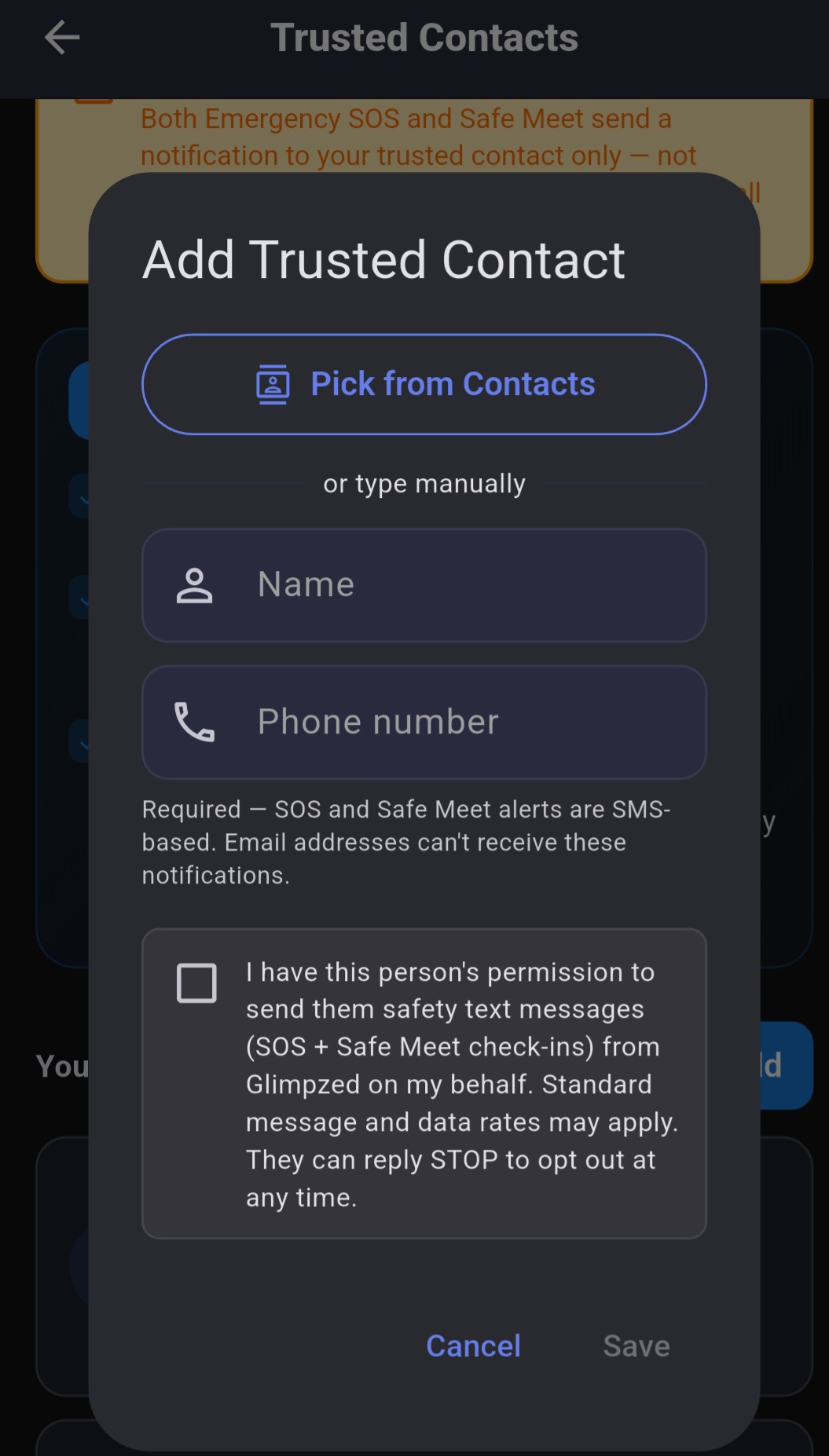
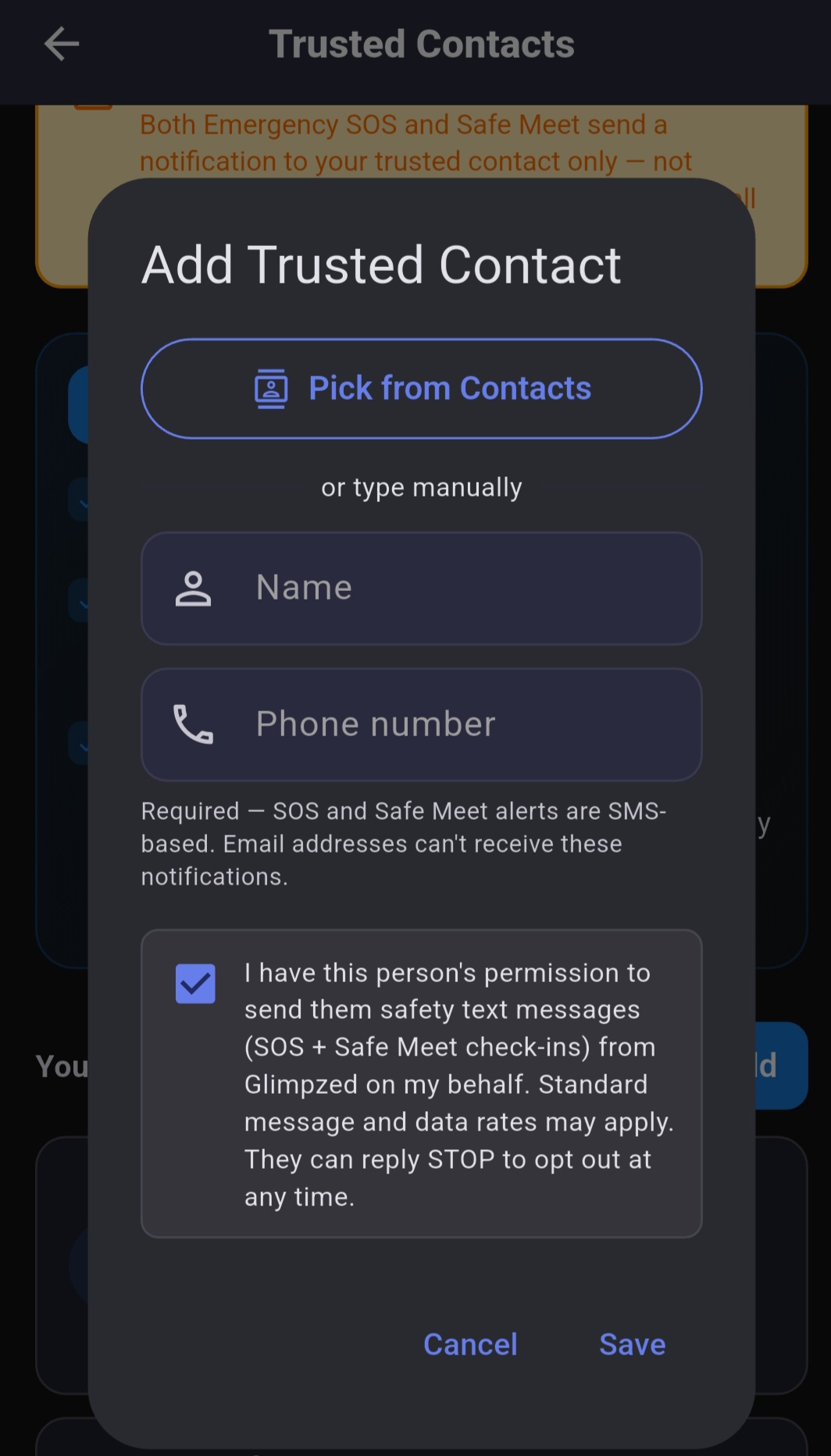
Screenshots taken 2026-07-11 from a live Glimpzed Android build. The verbatim consent text visible in both screenshots matches the app source at lib/screens/trusted_contacts_page.dart:611-615. Note that name/phone fields are shown empty for privacy — no real Trusted Contact PII is exposed.
Required disclosures
Opt-out (STOP) and help (HELP) keywords
Trusted Contacts can opt out of receiving Glimpzed SMS at any time by replying STOP, STOPALL, UNSUBSCRIBE, CANCEL, END, or QUIT to any Glimpzed message. Opt-out is honored immediately by our SMS provider — no further messages will be sent to that number by Glimpzed from any account until they opt back in by replying START.
Recipients seeking help may reply HELP or INFO to any Glimpzed SMS to receive an automated informational response, or email support@glimpzed.app.
Sample SMS content
Emergency SOS
Glimpzed SOS: [First Name] triggered an emergency alert at [time]. Approximate location: [map link]. Reply STOP to opt out.
Safe Meet overdue check-in
Glimpzed: [First Name]'s Safe Meet check-in was due at [time] and has not arrived. Last known location: [map link]. Reply STOP to opt out.
Legal references
- Privacy Policy — full data-handling terms, including §5A "SMS Communications (Twilio)" which duplicates the disclosures above for the account holder's own reference at signup
- Terms of Service — §2 (18+ Age Attestation), §11A (biometric consent), and §Safety-Feature Use (Trusted Contact designation and consent representation)